
Other products mentioned in this guide

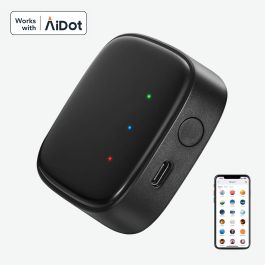
The Linkind Matter Smart Hub 2 is a possible addition to a compatible outdoor-light installation when nearby phone control no longer meets your needs. The decision is about a connection path, not simply owning a device with a hub in its name. This guide interprets manufacturer information; we have not tested the bridge or its coverage.
Understand the job of this box
Linkind describes Hub 2 as a bridge that connects compatible Linkind BLE Mesh outdoor lights to Matter. It uses a powered Wi-Fi connection. That documentation does not establish it as a universal Matter controller, a general Zigbee hub or a Thread Border Router. Official Hub 2 information
In a shopping plan, draw three labeled boxes: the actual lights, their compatible bridge, and the chosen home platform. If you cannot explain which box performs each part of the desired action, stop the compatibility check there. An additional box should remove a documented limitation, rather than become a hopeful answer to an unclear setup.
First ask whether a bridge is necessary
Some light workflows need less infrastructure than others. The SP6 documentation, for example, distinguishes direct Bluetooth app control from hub-supported voice control. This means a buyer wanting only a nearby settings change may have a different shopping list from a household wanting voice commands. SP6 control FAQ
We would begin with a sentence describing the requirement: control the garden lights from the house, include them in a supported scene, or share access with another household member. Then check the current documentation for that specific action. If the direct workflow already does what you need, the bridge's theoretical expansion capacity is not itself a reason to buy it.
Compatibility belongs to the exact light
Create an inventory of full product names and printed model numbers. Keep variants and regional versions separate. Similar branding, a Bluetooth connection or a shared app cannot establish that every device joins this particular bridge.
The older Linkind Bluetooth hub is documented separately. Information about that generation should not be used to promise Hub 2 behavior, or the reverse. Linkind's older hub description
Ask for confirmation that each intended light is supported and which controls appear in the destination home app. A bridge can expose useful basic controls without carrying every manufacturer-specific scene or effect into another platform. Treat an unsupported special effect as a decision point: is the standard app route acceptable, or is that effect essential to the purchase?
Plan a powered location
Solar lights do not make the bridge itself solar powered. The installation plan should include a suitable powered position and the documented network requirements. Consider the actual separation between that position and the lights, including doors and walls, rather than relying on an open-space range claim.
No coverage measurements are available from our team. A sensible first evaluation is a small number of confirmed compatible lights near the proposed location. Assess the desired controls before expanding toward a manufacturer's maximum device count. Maximum capacity and dependable coverage of an individual garden are separate questions.
Compare the package, not just the title
We have two supply candidates, B0HF49HNZS and B0HF31H1L7. They may represent different packages within the same family. Until the contents are verified, they should not be counted as two independent hub models or compared as equivalent single-unit purchases.
List the bridge, power accessories and any bundled lights separately. If you already own some of those components, focus the comparison on what the purchase actually adds. A larger bundle is only useful when the extra lights fit a planned position and the same verified control path.
Our buying judgment
Hub 2 belongs on a shortlist when your exact lights are supported and the bridge enables a function you will regularly use. We would postpone it when basic nearby control is sufficient or when cross-platform functionality is still assumed. The official material describes the workflow but does not resolve every feature's fee policy. Verify the specific services you require before calling the entire setup subscription-free; bridge hardware, ecosystem hardware and optional services are distinct ownership questions.
Check the exact listing
These affiliate links may earn us a commission. Confirm the model, package, current price, stock and compatibility on the retailer page. A listed product is not a promise that every feature or accessory is included.

Linkind · Amazon US
Linkind Matter Smart Hub 2
Selected listing: B0HF49HNZS
View this model on AmazonSources and method
Based on the manufacturer documentation linked below. Features, app requirements and optional services can change. Check the exact model and package before purchase.